I Built a Free Embeddable Carry-On Size Widget for Travel Blogs
A free, zero-tracking carry-on size checker widget that any travel blog can embed in two lines of code. 75 airlines, auto-updating data, and full theme customization.
A travel blogger emailed me a few weeks ago asking if she could embed our carry-on size checker directly into one of her posts. She was writing a packing guide for budget airlines and wanted her readers to check their specific bag against each airline without leaving the page. I told her no, because the tool was a full-page Astro component with site-wide styles, a navigation bar, and a footer. It was not designed to live inside someone else’s site.
That request stuck with me. I looked around for existing embeddable carry-on checkers that a travel blogger could just drop into a post. The options were bad. Most “widgets” were just affiliate links dressed up as tools. The few real ones had outdated data, tracked visitors, or required a paid account. Nobody was doing the obvious thing: a free, lightweight iframe with verified airline data that auto-updates.
So I built one.
What it does
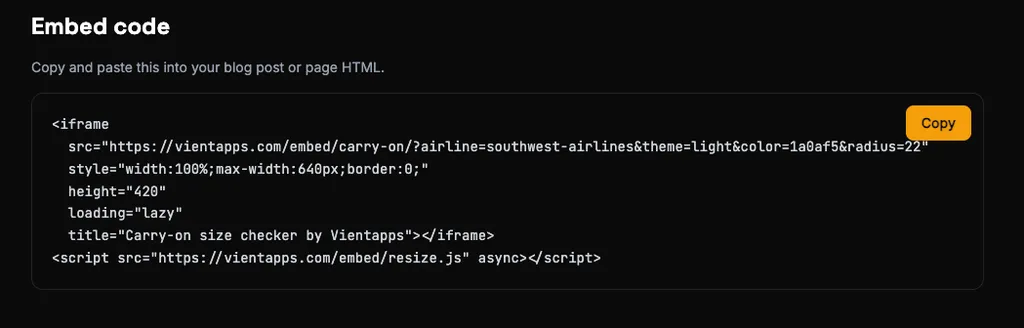
The carry-on size embed widget is a drop-in carry-on bag size checker for any website. Two lines of HTML. No accounts, no API keys, no tracking.
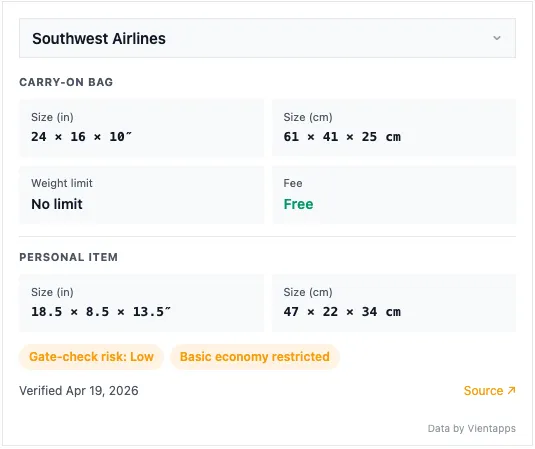
A reader picks an airline from the dropdown and sees carry-on dimensions (inches and centimeters), personal item limits, weight restrictions, the carry-on fee, and a gate-check risk rating. Every data point links back to the airline’s official baggage policy page with a “last verified” date.
It covers 75 airlines across North America, Europe, Asia-Pacific, Latin America, and the Middle East. When we update the data, every embedded widget everywhere reflects the change automatically. The site owner does nothing.
Here is the widget itself, running live inside this post. Pick any airline to see exactly what a reader would see on a travel blog that had embedded it:
The widget supports light, dark, and auto (OS preference) themes. You can set a custom accent color, adjust corner radius, toggle compact mode for sidebars, and lock it to a default airline. A visual customizer on the landing page lets you configure everything and copy the embed code.
How I worked with Claude on this one
This was a pairing build. I described the concept and Claude (via Claude Code) did most of the initial implementation, but a big chunk of the work was not the widget itself. It was the data layer underneath it.
We already had 75 airlines in a JSON file, but keeping that data fresh is the real problem. Airlines change their baggage policies constantly. A checked bag fee goes up $5, a weight limit changes from 15 kg to 10 kg, a basic economy restriction gets added quietly. So Claude and I spent a significant amount of time building a manifest-driven fact refresh system that verifies data on a rolling 30-day cycle. Every fact gets checked against two independent sources before it is trusted. If the sources disagree, a third source breaks the tie. If an auto-fix happens, any comparison articles referencing that airline get flagged for prose review.
We turned that entire verification system into a Claude Code skill, so I can run /refresh-facts airlines and it will triage the most stale airline records, verify them against official sources and aggregators like The Points Guy and NerdWallet, and auto-fix what it can. That pipeline is what makes the embed widget trustworthy. Without it, this would just be another tool with stale data.
The stack
Astro 5.x, static output, deployed to Cloudflare Pages. The widget is an iframe pointing at /embed/carry-on/, which is a standalone Astro page with zero external dependencies. All CSS is inline and scoped to a .va-embed class prefix to avoid leaking into host pages. All JavaScript is inline too. No framework, no bundler output, no external requests after page load.
The airline data gets serialized into the widget HTML at build time via a <script type="application/json"> tag. This means the widget is a single static HTML file with everything baked in. No runtime data fetches. The total payload is under 50 KB.
Claude suggested compressing the airline data for the widget by mapping verbose property names to short keys:
const airlines = allAirlines.map(a => ({
  slug: a.slug,
  name: a.name,
  ci: a.carryOn.dimensionsIn,
  cc: a.carryOn.dimensionsCm,
  wLb: a.carryOn.weightLimitLb,
  wKg: a.carryOn.weightLimitKg,
  fee: a.carryOn.feeUsd,
  ok: a.carryOn.allowed,
  piI: a.personalItem.dimensionsIn,
  piC: a.personalItem.dimensionsCm,
  risk: a.gateCheckRisk,
  be: a.basicEconomyRestricted,
  lv: a.lastVerified,
  src: a.sourceUrl,
}));
Not revolutionary, but it cut the JSON size meaningfully when you multiply it by 75 airlines. That was a pattern I would not have bothered with on my own for a v1.
The hard part: iframe auto-resize
Iframes do not auto-expand to fit their content. The widget height varies depending on the airline (some have weight limits, some do not, some do not allow carry-ons at all), the theme, and whether compact mode is on. A fixed height="420" works as a sensible default, but it leaves whitespace or clips content depending on the selection.
The solution is a postMessage handshake between the widget and the host page. The widget measures its own height and tells the parent:
function sendResize() {
  if (window.parent !== window) {
    window.parent.postMessage({
      type: 'va-embed-resize',
      height: document.documentElement.scrollHeight
    }, '*');
  }
}
The host page loads a 14-line script that listens for that message and adjusts the iframe height:
window.addEventListener("message", function (e) {
  var d = e.data;
  if (!d || d.type !== "va-embed-resize" || typeof d.height !== "number")
    return;
  var frames = document.querySelectorAll("iframe");
  for (var i = 0; i < frames.length; i++) {
    if (frames[i].contentWindow === e.source) {
      frames[i].style.height = d.height + "px";
      break;
    }
  }
});
The resize fires on initial load, on airline selection change, and via a ResizeObserver for anything else that shifts the layout. I solved this one myself. Claude’s first approach was to set a generous fixed height and call it done, which would have worked but looked sloppy on most sites.
Where Claude surprised me
The data compression was the standout. When I described the widget concept, Claude immediately suggested compressing the property names for the embedded JSON payload and explained why: the full airlines.json with verbose keys is ~9,500 lines. The widget only needs display fields, so mapping to single-letter keys and dropping unused nested objects (checked bags, special items, basic economy details) keeps the widget fast on mobile connections. It is the kind of optimization I would have deferred to v2 or never done.
Where Claude fell short
The first version Claude built was too basic. It was functional, it showed airline data in a dropdown, but it was not something a real travel blogger would want on their site. No theme options, no custom colors, no border radius control, no compact mode. It worked, but only for one kind of site with one kind of design.
I had to push Claude through several rounds of “make this actually reusable.” Custom accent colors via URL parameters. Light, dark, and auto themes with proper CSS custom properties. A radius slider. A compact mode that scales all spacing proportionally. Each round Claude executed well, but it did not anticipate that an embeddable tool needs to fit into someone else’s design system, not just look good on its own. That product thinking was on me.
What went wrong overall
The URL parameter validation was a subtle security concern. The widget reads theme, color, radius, and airline from query parameters, and those parameters get applied to CSS and DOM attributes. Claude’s initial implementation did not validate the color parameter, which could have been a vector for CSS injection. I caught it and we added a strict hex regex:
var colorParam = params.get('color');
if (colorParam && /^[0-9a-fA-F]{6}$/.test(colorParam)) {
  root.style.setProperty('--accent', '#' + colorParam);
}
The radius gets clamped to 0-24, the theme only accepts 'light' or 'dark', and the airline slug is checked against the data map before use. None of these would have caused a major exploit, but shipping an embeddable widget means your code runs on someone else’s site. The bar is higher.
Where it is now
The widget is live at vientapps.com/embed with 75 airlines, full customization, and a visual configurator that generates the embed code. The data pipeline behind it runs on a 30-day verification cycle. Three more embeddable widgets are planned: cruise cabin size checker, checked bag fee calculator, and an airline comparison table.
What I would do differently
First, I would have spec’d the customization options before writing any code. Starting with a bare widget and retrofitting theme support, custom colors, and compact mode was more work than doing it upfront. The widget essentially got rebuilt twice.
Second, I would have built the data compression into the widget from the start rather than serializing the full airline objects and trimming later. Starting with a clear “widget data contract” separate from the full airline schema would have been cleaner.
Third, the fact refresh system should have existed before the embed widget, not alongside it. Building an embeddable tool and a data verification pipeline at the same time meant splitting focus. The refresh system was the more important piece, and getting it right first would have made the widget launch feel less rushed.
Frequently Asked Questions
What is the carry-on size embed widget? +
It is a free, embeddable carry-on bag size checker that travel bloggers and website owners can add to any page with two lines of HTML. It covers 75 airlines with verified carry-on and personal item dimensions, weight limits, gate-check risk ratings, and fees. The widget auto-updates when airline policies change.
How do I add the carry-on widget to my WordPress site? +
Open the WordPress block editor, add a Custom HTML block, and paste the two-line embed code from vientapps.com/embed/. The widget renders immediately in the preview and on your published page. No plugin required.
Does the widget slow down my website? +
No. The widget loads inside a lazy-loaded iframe that totals under 50 KB. It makes zero external requests after the initial page load, so it will not affect your Core Web Vitals or Lighthouse score.
Does the widget track my visitors? +
No. The widget sets no cookies, runs no analytics, and makes no third-party requests. Your readers' privacy is fully preserved.
Can I customize the widget to match my site design? +
Yes. The widget supports light, dark, and auto themes. You can set a custom accent color via hex code, adjust corner radius, enable compact mode for sidebars, and set a default airline. A visual customizer at vientapps.com/embed/ lets you configure everything and preview it live.
How often is the airline data updated? +
The airline database is verified on a rolling 30-day cycle using a two-source verification system. Each airline record has a last-verified date and a link to the official source page. When data is updated, every embedded widget reflects the change automatically with no action required from the site owner.
What platforms support the embed widget? +
Any platform that allows HTML embeds: WordPress, Squarespace, Ghost, Webflow, Wix, Jekyll, Hugo, Astro, Next.js, and plain HTML sites. If you can paste an iframe tag, the widget works.
Is the carry-on widget really free? +
Yes. No accounts, no API keys, no usage limits, no payments. The only requirement is keeping the small 'Data by Vientapps' attribution link visible.
Senior Staff Engineer and Indie Developer
Caden Sorenson is a senior staff engineer with 15+ years of experience building iOS apps, web platforms, and developer tools. He holds a Computer Science degree from Utah State University and runs Vientapps, an indie studio based in Logan, Utah, where he ships small, focused tools and writes about every build in public.
Share this post
Related posts
- Building the Carry-On and Personal Item Size CheckersTwo free tools that tell you whether your bag fits a given airline, built on a hand-verified dataset of 50 carriers, orientation-agnostic math, and a single JSON file.
- I Built an SEO Scanner That Actually Checks if AI Can Find YouLighthouse doesn't check if ChatGPT can crawl your site. So I built ShipReady, an SEO and AEO scanner that audits your site for the age of answer engines.
- I Replaced /usage and /context in Claude Code With a Single StatuslineYou already run /usage and /context all day. This bash statusline puts both, plus your 5h reset time and working directory, at the bottom of every Claude Code prompt as colored progress bars. Exact script inside.
Stay in the loop
Get notified when I publish new posts. No spam, unsubscribe anytime.
Built as part of
View the project →