I Built an SEO Scanner That Actually Checks if AI Can Find You
Lighthouse doesn't check if ChatGPT can crawl your site. So I built ShipReady, an SEO and AEO scanner that audits your site for the age of answer engines.
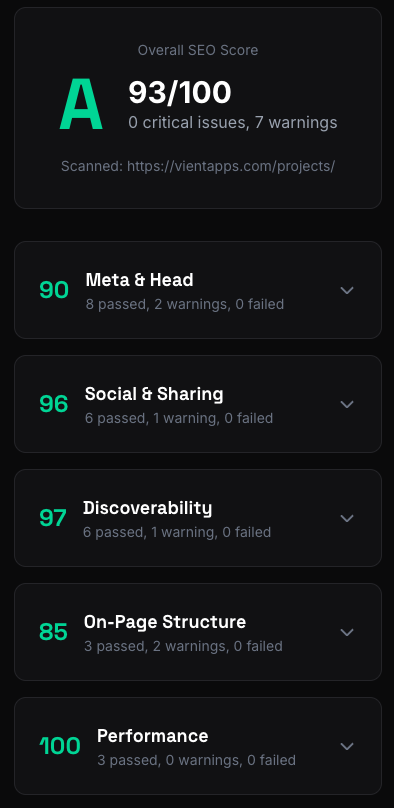
I kept running Lighthouse on my sites and getting green scores across the board. Great. But then I’d ask ChatGPT about one of my projects and get nothing. Perplexity didn’t know it existed. My SEO was fine. My AEO was invisible.
Lighthouse is a great tool, but it was built for a world where Google was the only game in town. It doesn’t check if your robots.txt blocks GPTBot. It doesn’t care about llms.txt. It has no concept of whether your content is structured for answer engines to extract and cite.
So I built ShipReady, a scanner that audits your site across seven categories, scores them with letter grades, and generates a “fix all” prompt you can paste directly into Claude or Cursor.
What It Does
You give it a URL. It fetches the page, follows redirects, grabs robots.txt and sitemap.xml and llms.txt in parallel, then runs 35+ checks across seven weighted categories:
- Meta & Head (23%) - title, description, charset, viewport, canonical
- Discoverability (19%) - HTTPS, robots.txt, sitemap, noindex detection
- On-Page Structure (19%) - heading hierarchy, alt text, internal links
- Social Sharing (14%) - Open Graph, Twitter Cards
- Performance (9%) - render-blocking scripts, compression, modern image formats
- Structured Data (8%) - JSON-LD validation, schema type suggestions
- Answer Engine Optimization (8%) - AI crawler access, llms.txt, question headings, speakable schema
The weighting is opinionated. Meta and head matter more than performance for discoverability. AEO is weighted lower because it’s newer, but it’s the category most tools completely ignore.
The killer feature is the fix prompt. Every failed check generates a code snippet, and ShipReady combines them into a single markdown prompt with critical issues, warnings, and guidelines. You copy it, paste it into your AI coding tool, and the fixes get applied.
The Stack
Astro 5 with a Cloudflare Workers adapter. The whole thing runs on the edge. No origin server, no cold starts worth worrying about, and the rate limiting uses Cloudflare KV with a one-hour TTL.
The interesting architectural choice was going fully server-side for the scanning. The API endpoint receives a URL, does all the fetching and parsing on the Worker, and returns a scored JSON result. The frontend is just a form and a renderer.
const [mainResponse, externalData] = await Promise.all([
  fetchFollowingRedirects(targetUrl),
  fetchExternalResources(validation.url),
]);

const parsedData = await parseHTML(mainResponse, finalUrl);
let categories = runAllChecks(parsedData, externalData);
categories = scoreCategories(categories);
Everything that can run in parallel does. The main page fetch and external resource fetch (robots.txt, sitemap, llms.txt) happen concurrently. The external resources use Promise.allSettled so a missing sitemap doesn’t tank the whole scan.
The Hard Part: Parsing HTML Without a DOM
Cloudflare Workers have tight memory constraints. I couldn’t pull in jsdom or cheerio. So the entire HTML parser is regex-based. Every meta tag, heading, image, script, and anchor gets extracted with handwritten regex patterns.
function getAttr(tag: string, attr: string): string | null {
  const re = new RegExp(`${attr}\\s*=\\s*(?:"([^"]*)"|'([^']*)'|([^\\s>]+))`, 'i');
  const m = tag.match(re);
  if (!m) return null;
  return decodeHtmlEntities(m[1] ?? m[2] ?? m[3]);
}
This little function handles double-quoted, single-quoted, and unquoted attribute values, then decodes HTML entities. It’s called hundreds of times per scan. Every tag type gets its own regex loop over the HTML string, and the parser splits head from body so script detection can tell whether a <script> tag is render-blocking or not.
It works. It’s fast. But writing regex to parse HTML is one of those things where you know you’re technically doing it wrong and you do it anyway because the constraints demand it.
The False Positives
The first version flagged basically every Cloudflare-hosted site for missing text compression. That was fun.
The problem: Cloudflare Workers auto-decompress fetch responses. When ShipReady fetched a page, the content-encoding header was already stripped. The server was compressing, but the scanner couldn’t see it.
const contentEncoding = data.responseHeaders['content-encoding'];
const vary = data.responseHeaders['vary'] || '';
const hasCompression =
  (contentEncoding && (contentEncoding.includes('gzip') || contentEncoding.includes('br'))) ||
  vary.toLowerCase().includes('accept-encoding');
The fix was checking the Vary: Accept-Encoding header as a secondary signal. If the server varies its response based on encoding, it’s compressing. Not perfect, but it eliminated the false positives.
There was another one with type="module" scripts. The original code flagged any script in the <head> without async or defer as render-blocking. But ES modules are deferred by spec. Every modern Astro and Vite site ships module scripts, so every modern site was getting dinged for something that isn’t actually a problem.
The AEO Category
This is the part I’m most interested in. Traditional SEO tools don’t touch this. The AEO checks look at eight things:
- Whether your robots.txt blocks AI crawlers (GPTBot, ClaudeBot, PerplexityBot, etc.)
- Whether you have an llms.txt file
- Whether your meta description uses generic filler language
- Whether your H1 is descriptive or just “Home”
- Whether you have FAQ/HowTo schema markup
- Whether your H2/H3 headings are phrased as questions
- Whether you have enough content depth for citation
- Whether you have speakable schema for voice assistants
The AI crawler detection parses robots.txt line by line, tracking user-agent blocks and matching against a list of known crawlers:
const AI_CRAWLERS = [
  'GPTBot', 'ChatGPT-User', 'ClaudeBot', 'Claude-Web',
  'PerplexityBot', 'Bytespider', 'Google-Extended', 'Applebot-Extended',
];
It’s surprising how many sites block all of these by default. Some hosting platforms and CMS plugins add blanket AI crawler blocks without telling you. Your content is invisible to answer engines and you don’t even know it.
Where It Is Now
ShipReady is live at vientapps.com/tools/seo-check. It’s free, rate-limited to 10 scans per hour per IP, and the source is on GitHub.
The scoring uses a weighted system where each check has a weight of 1-3, warnings count for half their weight, and categories are weighted by importance. An A is 90+, F is below 60.
What I’d Do Differently
Lean harder into AEO. Right now it’s 8% of the overall score. That felt right when I was trying to balance against established SEO fundamentals, but honestly, the SEO checks are table stakes at this point. Everyone has a meta description. Not everyone has an llms.txt or question-style headings. The AEO category is the unique value here and it should probably carry more weight.
Get more people using it. I built this for my own sites, but the false positive bugs proved I need a wider range of test cases. Different hosting platforms, different frameworks, different CMS setups. The Cloudflare compression bug only showed up because I was scanning Cloudflare-hosted sites. There are probably similar platform-specific quirks I haven’t hit yet.
More actionable fix prompts. The current prompts are good but generic. If I could detect the framework (Astro vs Next vs plain HTML) and tailor the fix snippets to that framework’s conventions, the copy-paste experience would be much better.
Share this post
Stay in the loop
Get notified when I publish new posts. No spam, unsubscribe anytime.
Built as part of
View the project →