Building a Checked Bag Fee Calculator Widget That Actually Computes
How I built a framework-free fee calculator widget that computes overweight surcharges, estimates third bags, and sorts 75 airlines by total cost, all inside an iframe.
The carry-on size widget was a lookup tool. Pick an airline, see its dimensions. The data was static per airline, the rendering was a fixed card, and the interesting engineering was in the iframe plumbing and data pipeline underneath it. When a reader and a few travel bloggers asked for an embeddable version of our checked bag fee tool, I assumed it would be the same build with different data. It was not.
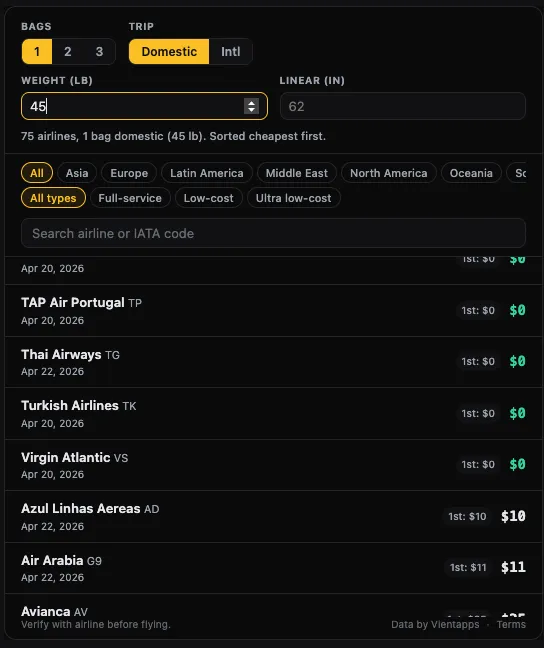
The checked bag fee widget is a calculator. It takes four inputs (bag count, trip type, weight, linear dimensions), computes a per-airline total from six different fee fields, handles null data without lying about costs, sorts 75 airlines by computed total, and badges the cheapest and most expensive results. That computation layer is what made this widget genuinely different from the carry-on embed, and it is where most of the interesting problems lived.
What it does
The checked bag fee calculator widget lets a reader on any blog compare checked bag costs across 75 airlines with their specific trip details. Select 1, 2, or 3 bags. Toggle domestic or international. Enter a weight and linear dimension if you want to catch overweight and oversize surcharges. The widget computes the total for every airline and sorts cheapest first.
Each airline row shows the individual fee breakdown (first bag, second bag, international rate) plus the computed total. Airlines with free checked bags show a green “$0.” Airlines where the bag exceeds the weight limit or oversize threshold get a warning badge. The cheapest airline gets a “Cheapest” badge, the most expensive gets “Most expensive.”
All of this runs inside a single iframe. No framework, no external requests after page load, under 50 KB total. Two lines of HTML to embed.
How I worked with Claude on this one
This was the fastest widget build we have done. The carry-on widget established all the infrastructure: the iframe-to-host postMessage resize handshake, the resize.js listener, the URL parameter validation patterns, the inline-everything-for-zero-dependencies approach, the Astro embed page template, the widget landing page layout with the visual customizer. All of that already existed.
So when I described the checked bag fee widget to Claude via Claude Code, it copied the existing patterns and had a working first version in one session. The carry-on widget was a two-day build. This one was half a day. Most of my time went into the calculator logic and the resize timing, not infrastructure.
The stack
Same as the carry-on widget: Astro 5.x, static output, Cloudflare Pages. The widget is a standalone Astro component at src/components/embed/CheckedBagFeesWidget.astro with all CSS and JavaScript inline. The airline data gets serialized into a <script type="application/json"> tag at build time, so there are no runtime fetches.
The data shape is compressed the same way as the carry-on widget, mapping verbose property names to short keys to keep the payload small across 75 airlines:
const airlines = allAirlines
  .filter(a => a.checkedBag)
  .map(a => ({
    slug: a.slug,
    name: a.name,
    iata: a.iata,
    region: a.region,
    cat: a.category,
    first: a.checkedBag.firstBagUsd,
    second: a.checkedBag.secondBagUsd,
    intl: a.checkedBag.firstBagIntlUsd,
    over70: a.checkedBag.overweight51to70Usd,
    over100: a.checkedBag.overweight71to100Usd,
    oversize: a.checkedBag.oversize63to80Usd,
    wLim: a.checkedBag.weightLimitLb,
    lv: a.checkedBag.lastVerified ?? a.lastVerified,
  }));
Six fee fields per airline instead of the carry-on widget’s three. That is where the complexity budget went.
The hard part: computing totals with holes in the data
The core of the widget is a computeTotal() function that takes an airline and the current calculator state and returns a total fee plus any warning flags. This sounds simple until you account for all the edge cases.
Third bags do not have a published fee for most airlines. We estimate them at 1.5x the second bag fee, which is close to what most carriers charge. If the second bag fee is null, the third bag estimate is also null. Overweight surcharges apply at two thresholds: 51-70 lb and 71-100 lb. Bags over 100 lb are rejected by most airlines entirely. Oversize kicks in between 63 and 80 linear inches. Over 80, most airlines refuse the bag.
function computeTotal(a) {
  var firstFee = trip === 'international'
    ? (a.intl !== null ? a.intl : a.first)
    : a.first;
  var parts = [];
  var flags = [];

  if (bagCount >= 1) parts.push(firstFee);
  if (bagCount >= 2) parts.push(a.second);
  if (bagCount >= 3) parts.push(
    a.second !== null ? Math.round(a.second * 1.5) : null
  );

  var weight = parseFloat(weightInput.value);
  if (!isNaN(weight) && weight > 0) {
    if (weight > 100) flags.push('Exceeds weight');
    else if (weight > 70) parts.push(a.over100);
    else if (weight > 50) parts.push(a.over70);
    if (a.wLim !== null && weight > a.wLim)
      flags.push('Over limit');
  }

  if (parts.some(function(p) { return p === null; }))
    return { total: null, flags: flags };
  var total = 0;
  for (var i = 0; i < parts.length; i++) total += (parts[i] || 0);
  return { total: total, flags: flags };
}
The critical line is the null check near the bottom. If any parts entry is null, the whole total is null. This was a deliberate design decision. If we do not know the overweight surcharge for an airline and the reader entered 65 lb, showing just the base bag fee would be misleading. It would look like that airline is cheaper than it actually is. Better to show “N/A” and let the reader check the airline’s site.
Claude wrote the first version of this function. I rewrote the null propagation. Claude’s original version defaulted nulls to zero, which would have ranked airlines with missing surcharge data as the cheapest options. That is exactly the kind of subtle data bug that makes a tool untrustworthy.
Where Claude surprised me
The badge assignment logic in the apply() function. After sorting all airlines by computed total (with nulls pushed to the bottom via a 999999 sentinel value), the widget needs to label the cheapest and most expensive results. Claude handled the edge cases I would have missed:
var badge = '';
if (item.flags.length > 0) {
  badge = '<span class="cbf-badge cbf-badge-warn">'
    + item.flags.join(' / ') + '</span>';
} else if (filtered.length > 1 && item.total !== null) {
  if (j === 0) {
    badge = '<span class="cbf-badge cbf-badge-cheap">Cheapest</span>';
  }
  var lastWithTotal = -1;
  for (var k = filtered.length - 1; k > 0; k--) {
    if (filtered[k].total !== null) { lastWithTotal = k; break; }
  }
  if (j === lastWithTotal && j !== 0) {
    badge = '<span class="cbf-badge cbf-badge-expensive">'
      + 'Most expensive</span>';
  }
}
Warning flags take priority over cost badges. The “Most expensive” label skips airlines with null totals by walking backward from the end of the sorted list to find the last airline with a real number. If only one airline has data, neither badge shows. Claude got all of this right on the first pass. I was about to write it myself and realized it was already done.
Where Claude fell short
The resize timing. This is the problem I called out in the interview: getting the iframe height right after the page loads, not just when a user interacts with it.
The carry-on widget had a simpler version of this problem because its content height is mostly stable. Pick an airline, the card renders, send a resize. But the checked bag fee widget renders a scrollable list of 75 airlines on load, and the list height depends on which filters are active, how many results match, and whether the calculator inputs have changed the sort order.
Claude’s first approach was to fire sendResize() once after apply(). That works if the iframe’s content has finished painting by the time the message sends. It often had not. The iframe would load, apply() would run, the resize message would fire with a stale height, and then the actual content would paint at a different height. The result was clipped content or extra whitespace depending on the timing.
I ended up writing the resize timing myself. The solution is a combination of interval polling and ResizeObserver:
var pollCount = 0;
var pollId = setInterval(function() {
  sendResize();
  if (++pollCount >= 50) clearInterval(pollId);
}, 200);

if (typeof ResizeObserver !== 'undefined') {
  new ResizeObserver(sendResize).observe(root);
}
The polling catches the initial render window: 50 checks at 200ms intervals covers the first 10 seconds, which is enough for any reasonable page load. The ResizeObserver takes over after that for ongoing changes (filter toggles, search narrowing, weight input). Belt and suspenders. It is not elegant, but it works on every host page I have tested.
What went wrong overall
The fee data itself was the hardest non-code problem. Airline baggage fees are surprisingly inconsistent in how they are published. Some airlines list fees per direction, some per round trip. Some publish overweight surcharges on the same page as standard fees, some bury them in a separate “special items” page. A few airlines publish different fees depending on the booking channel (website vs airport vs phone).
I had to make normalization decisions: all fees are one-way, all fees are the website/online booking price, overweight thresholds are standardized to the 51-70 and 71-100 lb brackets even when an airline uses slightly different breakpoints. These are reasonable defaults, but they mean the widget’s numbers are close approximations, not guaranteed quotes. That is why every airline row links to the official source page.
Where it is now
The widget is live at vientapps.com/tools/widgets/checked-bag-fees with the same customization options as the other two widgets: light/dark/auto themes, custom accent colors, adjustable corner radius, compact mode for sidebars, and URL parameters to pre-set the bag count, trip type, weight, and dimensions. It is also embedded in several of our own guides, including the best checked bag fee calculators roundup and the how to add travel widgets tutorial.
What I would do differently
First, I would have written the computeTotal() function test-first. The null propagation, threshold logic, and third-bag estimation have enough edge cases that a simple test harness with a few mock airlines would have caught the zero-default bug Claude introduced before I noticed it in the UI. Writing calculator logic without tests and then debugging it visually was slower than it needed to be.
Second, the resize polling is a hack I should replace. A MutationObserver on the list element, firing only when innerHTML changes, would be more precise than polling 50 times and hoping one of those polls lands after paint. The current approach works, but it sends dozens of unnecessary postMessage calls to the host page during the first 10 seconds of load.
Third, I should have standardized the fee normalization rules in the data layer, not in the widget. Right now, the normalization decisions (one-way fees, online booking price, standardized weight brackets) are baked into the data entry process and documented nowhere except my own notes. If someone else contributes airline data, they would not know which conventions to follow. That is a data pipeline problem, not a widget problem, but the widget is what exposed it.
Frequently Asked Questions
How does the checked bag fee widget calculate total cost? +
The widget takes bag count, trip type, weight, and linear dimensions as inputs and computes a total by summing the relevant fees for each airline. It handles overweight surcharges at two thresholds (51-70 lb and 71-100 lb), oversize fees for bags between 63 and 80 linear inches, and estimates third bag fees at 1.5x the second bag price. If any fee in the chain is unknown, the total returns null instead of showing a wrong number.
Why does the widget use vanilla JavaScript instead of a framework? +
The widget runs inside an iframe on other people's sites. Shipping React or Svelte into an embed would add 30-100 KB of framework code for a component that needs to filter a list, sum some numbers, and sort. Vanilla JS keeps the entire widget under 50 KB including airline data for 75 carriers.
How does the widget handle airlines with missing fee data? +
If any fee component in the total calculation is null, the entire total is null. The airline still appears in the list but shows N/A instead of a dollar amount and sorts to the bottom. This prevents the widget from displaying a misleadingly low total when a surcharge exists but is not in the database.
How does iframe resizing work when the content changes dynamically? +
The widget uses a combination of interval polling and ResizeObserver. On load, it polls its own height via postMessage 50 times at 200ms intervals to catch the initial render and any layout reflows. After the polling window, a ResizeObserver takes over and fires resize messages whenever the root element's dimensions change, such as when a user toggles filters or enters weight.
Senior Staff Engineer and Indie Developer
Caden Sorenson is a senior staff engineer with 15+ years of experience building iOS apps, web platforms, and developer tools. He holds a Computer Science degree from Utah State University and runs Vientapps, an indie studio based in Logan, Utah, where he ships small, focused tools and writes about every build in public.
Related posts
- I Built a Free Embeddable Carry-On Size Widget for Travel BlogsA free, zero-tracking carry-on size checker widget that any travel blog can embed in two lines of code. 75 airlines, auto-updating data, and full theme customization.
- I Let Claude Design My Homepage Hero and Shipped What It BuiltI gave Claude Design six 'decide for me' answers and it came back with a three-layer canvas flight animation. Two concepts, one conversation, and the whole thing is live on my homepage now.
- I Replaced /usage and /context in Claude Code With a Single StatuslineYou already run /usage and /context all day. This bash statusline puts both, plus your 5h reset time and working directory, at the bottom of every Claude Code prompt as colored progress bars. Exact script inside.
Stay in the loop
Get notified when I publish new posts. No spam, unsubscribe anytime.
Built as part of
View the project →